XNPV function
From Apache OpenOffice Wiki
< Documentation | How Tos
The printable version is no longer supported and may have rendering errors. Please update your browser bookmarks and please use the default browser print function instead.
Depreciation
Payment Streams, Annuities, Loans
Securities
Coupons
Miscellaneous
XNPV
Returns the net present value of an investment with irregular cash payments.
Syntax:
XNPV(rate; payments; dates)
- rate is the annual interest rate.
- payments is a range or array containing payments made, positive if paid to you, negative if you pay.
- dates is a range or array containing the dates on which those payments are made.
- XNPV calculates a net present value on the first date given (date0), using the formula:
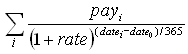
- where payi is the ith payment and datei the ith date, i starting at 0.

- The calculation assumes a 365-day year, even in a leap year.
Example:
XNPV(5%; B2:B4; C2:C4)
- where B2:B4 contains -1000, 500, 550 and C2:C4 contains the dates 2008-01-01, 2009-01-01, 2009-07-01, returns approximately -12.65. If you bought an investment for 1000 on 2008-01-01 which paid 500 on 2009-01-01 and 550 on 2009-07-01 you'd make a small loss, compared to investing at a 5% interest rate.
XNPV(5%; B2:B4; C2:C4)
- where B2:B4 contains 0, 500, 550 and C2:C4 contains the dates 2008-01-01, 2009-01-01, 2009-07-01, returns approximately 987.35, the net present value on 2008-01-01 of an investment which paid 500 on 2009-01-01 and 550 on 2009-07-01, using a 5% interest rate.
Issues:
- The calculation is based on a 365-day year, even in a leap year, using actual days difference. There are other ways to calculate net present value.
See Also

