Numbering Equations
From Apache OpenOffice Wiki


Numbering Equations
Equation numbering is one of AOO Math’s best hidden features. The steps are simple, but not necessarily intuitive:
- Start a new line.
- Type fn and then press F3 .
The fn is replaced by a numbered formula:
(2)
|
|---|

Now you can double-click on the formula to edit it. For example, here is the Riemann Zeta function:
(3)
|
|---|
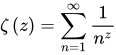
You can reference an equation (for example, “as shown in Equation (2)”) with these steps:
- Choose Insert → Cross-reference from the menu bar.
- On the Cross-references tab (Figure 17), under Type, select Text.
- Under Selection, select the equation number.
- Under Format, select Reference.
Click Insert .
Done! If you add more equations to the paper before the referenced equation, all the equations will automatically renumber and the cross-references will update.
 |
To insert the equation number without parentheses around it, choose Numbering instead of Reference under Format. |

| Content on this page is licensed under the Creative Common Attribution 3.0 license (CC-BY). |

