Numbering Equations
From Apache OpenOffice Wiki
The printable version is no longer supported and may have rendering errors. Please update your browser bookmarks and please use the default browser print function instead.


Numbering Equations
Equation numbering is one of AOO Math’s best hidden features. The steps are simple, but not necessarily intuitive:
- Start a new line.
- Type fn and then press F3 .
The fn is replaced by a numbered formula:
(2)
|
|---|

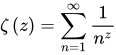
Now you can double-click on the formula to edit it. For example, here is the Riemann Zeta function:
(3)
|
|---|
You can reference an equation (for example, “as shown in Equation (2)”) with these steps:
- Choose Insert → Cross-reference from the menu bar.
- On the Cross-references tab (Figure 17), under Type, select Text.
- Under Selection, select the equation number.
- Under Format, select Reference.
Click Insert .
Done! If you add more equations to the paper before the referenced equation, all the equations will automatically renumber and the cross-references will update.
 |
To insert the equation number without parentheses around it, choose Numbering instead of Reference under Format. |

| Content on this page is licensed under the Creative Common Attribution 3.0 license (CC-BY). |

