Aligning shapes
From Apache OpenOffice Wiki
The printable version is no longer supported and may have rendering errors. Please update your browser bookmarks and please use the default browser print function instead.
- The Drawing toolbar
- Creating lines and shapes
- Working with 3D shapes
- Grouping shapes together
- Arranging shapes
- Flipping shapes
- Aligning shapes
- Alignment using the grid and snap guides
- Converting an object to a different type
- Setting up interaction with a shape or image
- Animating images
- Using Fontwork
Use the alignment tools to adjust the relative position of a graphic object compared to another object. Clicking on the Alignment icon in the Drawing toolbar opens the extended toolbar. The same alignment options are available from the right-click menu.
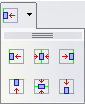
The Align extended toolbar.

The toolbar has six icons. The first three determine the horizontal alignment of the selected objects (Left, Center, Right); the other three determine the vertical alignment of the selected objects (Top, Middle, Bottom). If only one object is selected, it is aligned to the page, however when in a group, a single object is aligned to the edge of the group selection.
| Content on this page is licensed under the Creative Common Attribution 3.0 license (CC-BY). |

