Difference between revisions of "Sound for Animation Effects"
From Apache OpenOffice Wiki
(Created page with "<div class="body refbody"><p class="shortdesc">Frequently, after we set animation effects for objects in our presentation, we may still need to combine some sound with the animat…") |
(+cat) |
||
| Line 14: | Line 14: | ||
</div> | </div> | ||
</div> | </div> | ||
| + | |||
| + | [[Category:Education]] | ||
| + | [[Category:Impress]] | ||
Latest revision as of 16:53, 23 September 2013
Frequently, after we set animation effects for objects
in our presentation, we may still need to combine some sound with the animation effect. Here is a tip for you to add sound to the animation
effect.- Select the object for which animation effects have been set.
- Click Add button in the Custom Animation section on sidebar.
- Right-click the effect, on the context menu, click Effect Options dialog box opens.
- Under Effect tab, in Enhancement area, select one
sound for Sound field.
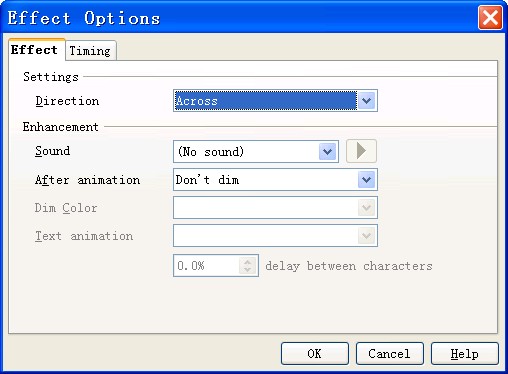
- Click OK.


